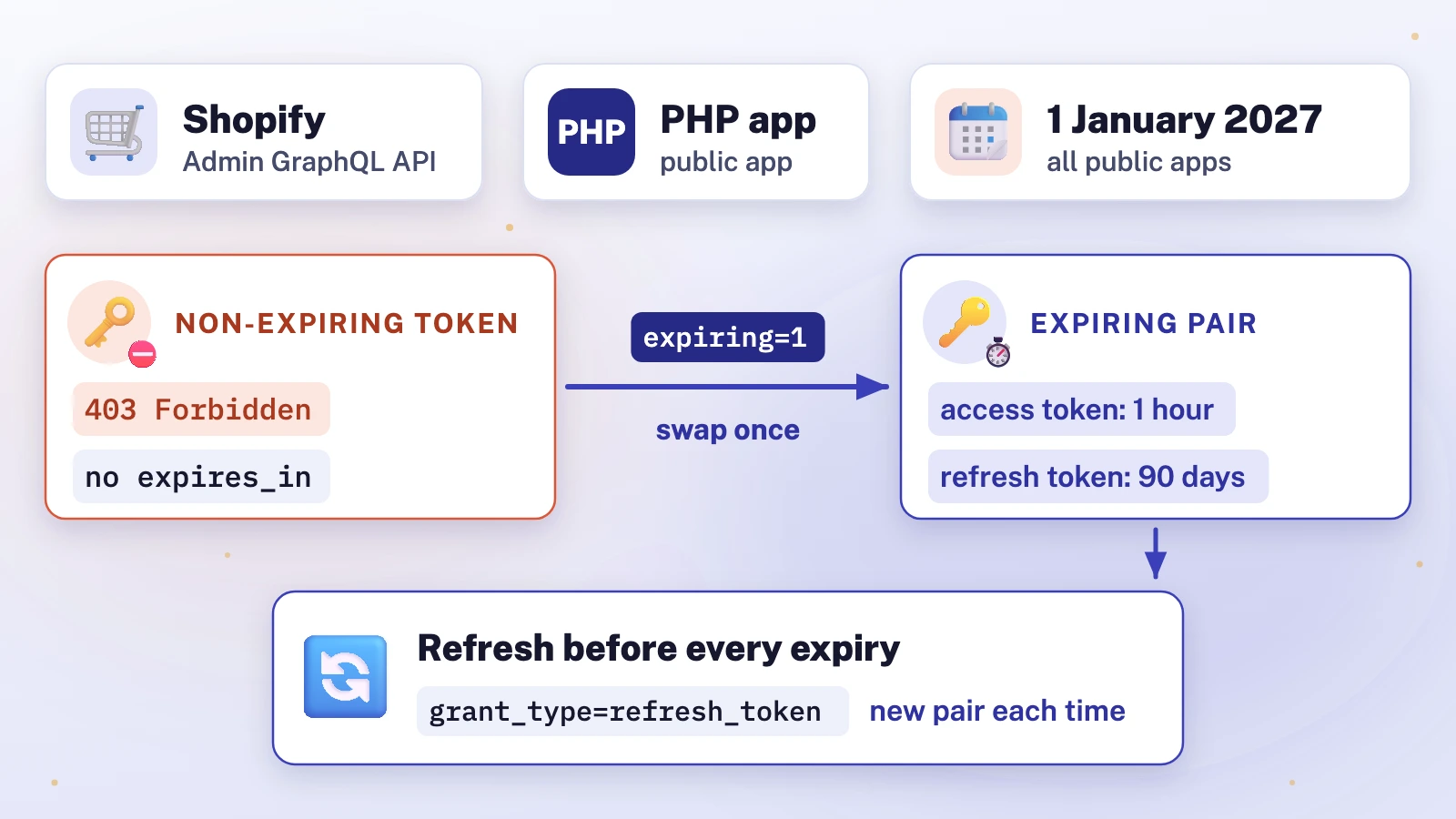
In short: From 1 January 2027, Shopify public apps must use expiring offline tokens on the GraphQL Admin API; new public apps have needed them since 1 April 2026. A non-expiring token gets 403 Forbidden, so request tokens with expiring=1, swap each stored token once, then refresh hourly.
Shopify is retiring offline access tokens that never expire. From 1 January 2027, a public app's background jobs fail on the GraphQL Admin API unless they hold a token that expires and is refreshed. One field note is labelled: the 403 an app hit when its token request left out one parameter.
Which Shopify apps need expiring offline tokens, and by when?
Shopify added optional expiry to offline tokens in December 2025: an access token that lasts 60 minutes, plus a refresh token that gets a new one without the merchant[1]. Two deadlines followed:
- Public apps created on or after 1 April 2026 must use expiring offline tokens now[2].
- All other public apps must use them from 1 January 2027. Shopify says that after that date "public apps still using non-expiring tokens will receive authentication errors"[3].
Custom apps and apps that merchants create in the Dev Dashboard or the Shopify admin are not affected[2][3]. Online tokens, which act as the staff member using the app, already expire within 24 hours[4] and are not part of this change.
Two Shopify pages differ on scope. The January 2027 changelog lists the Admin GraphQL and Admin REST APIs[3]; the migration guide says Shopify "enforces this on GraphQL Admin API requests only"[5]. Plan for the stricter reading and migrate any REST calls too.
To check where you stand, Shopify points to API Health in each app's Dev Dashboard, or to expires_in in your token responses[6]: an expiring offline token comes with it and a refresh token; a non-expiring one has neither[4].
What does the 403 look like, and how is it different from a missing scope?
When the GraphQL Admin API refuses a non-expiring token, it answers 403 Forbidden, and the errors value contains "Non-expiring access tokens are no longer accepted for the Admin API", followed by a link to the migration guide[5]. Match on that phrase, not on the whole string.
The trap is that a missing access scope also returns 403[5], and asking the merchant to approve scopes again changes nothing here. Read the message before you act on the status code:
- The phrase is present: the token type is wrong. Get an expiring token (the fix below).
- The phrase is absent: inspect the complete response before choosing a fix. A missing access scope can also return 403[5], but the absence of this phrase does not establish the cause.
How do you fix the 403 and migrate existing tokens?
- Ask for expiring tokens everywhere you get a token. Add
expiring=1to the token exchange request (embedded apps) and to the authorisation code grant (classic OAuth)[5]. Without it, Shopify still issues a token that the Admin API then refuses, as the field note below shows. - Swap every stored non-expiring token once. A token exchange with the old token as its subject returns an expiring pair; no merchant needs to reinstall or open the app[3][5].
- Store four values per store: the access token, the refresh token, and when each expires. The access token lasts one hour (
expires_inis 3600) and the refresh token 90 days (refresh_token_expires_inis 7776000)[4]. - Refresh a few minutes before the access token expires, and save the new pair each time: every refresh returns a new refresh token too[4][7].
- Refresh one store at a time. Two workers refreshing the same store at once can leave one holding a refresh token that has already been replaced[7], and a token exchange running beside a refresh retires one of the two results[4]. Use a per-store lock.
- Treat a 401 on refresh as final. Shopify returns
401withinvalid_requestfor every unusable refresh token[7]: stop retrying and get a new token when the merchant next opens the app. After network errors, timeouts, 429 or 5xx, retry later with the same refresh token[7].

The migration in step 2 has three rules that matter in production[5]:
- It permanently invalidates the old token for GraphQL Admin API requests, so save the new pair before you discard anything.
- If the response is lost, repeat the same request with the original token within seven days: eligible retries return the same tokens, with the access-token expiry extended if needed, so save the returned expiry values too. Recovery ends once the pair is refreshed or a later token acquisition retires it. If Shopify then answers
invalid_subject_token, get a new token through ID-token exchange or the authorisation code grant. - Both
requested_token_typeandexpiring=1are required; without them Shopify answers400withinvalid_.requested_ token_ type
Apps on Shopify's Remix or React Router templates switch on expiring tokens with a future flag and redeploy; newly scaffolded apps already have it[5].
How do you migrate a PHP Shopify app to expiring tokens?
Shopify's original PHP library, shopify/shopify-api, is marked "deprecated and no longer maintained"[8]. Its OAuth code at the last release, 6.1.1, never sends expiring=1 and has no refresh call, so its built-in offline OAuth flow cannot obtain or refresh expiring offline tokens[9]. Its replacement, shopify/shopify-app-php (1.0.2, for PHP 8.2 or later), requests expiring tokens by default and refreshes them with refreshTokenExchangedAccessToken[10]. Its token exchange takes ID tokens from the embedded admin only, with no call that swaps an old offline token[11]. That one-off swap, and refresh for apps that cannot move libraries yet, take a few lines of plain PHP.
Before you run anything: this code exchanges and replaces live credentials, permanently invalidating the old token for GraphQL Admin API requests. Keep the old token securely until the new pair is saved, because recovery needs it. Run it at your own risk, on a development store first, never on a live store before that, and take a backup of your token storage before the migration. iLogr cannot see your app and accepts no responsibility for lost access, data loss or downtime.
The first block posts a form to Shopify's token endpoint and keeps a reply only if it really expires:
<?php
// POST a form to Shopify's token endpoint. Returns [HTTP status, decoded JSON or null].
function shopify_token_request(string $url, array $form): array
{
    $ch = curl_init($url);
    curl_setopt_array($ch, [
        CURLOPT_POST => true,
        CURLOPT_POSTFIELDS => http_build_query($form),
        CURLOPT_HTTPHEADER => ['Accept: application/json'],
        CURLOPT_RETURNTRANSFER => true,
        CURLOPT_TIMEOUT => 20,
    ]);
    $body = curl_exec($ch);
    $status = curl_getinfo($ch, CURLINFO_RESPONSE_CODE); // 0 if no reply arrived
    return [$status, $body === false ? null : json_decode($body, true)];
}

// A reply without expires_in is a non-expiring token: refuse to store it.
function shopify_token_pair(?array $json): ?array
{
    if (empty($json['access_token']) || empty($json['refresh_token'])
        || empty($json['expires_in']) || empty($json['refresh_token_expires_in'])) {
        return null;
    }
    return [
        'access_token' => $json['access_token'],
        'refresh_token' => $json['refresh_token'],
        'expires_at' => time() + (int) $json['expires_in'],
        'refresh_expires_at' => time() + (int) $json['refresh_token_expires_in'],
    ];
}
The second block shows two separate operations, the one-off swap and the later refresh with the saved pair, and leaves out persistence, locking and scheduling. Wrap both in a per-store lock that also covers the database write, save all four values together only after HTTP 200 and a non-null shopify_token_pair, and never overwrite stored credentials with null. The variables come from your own configuration and database, and $shop must already be checked as a .myshopify.com domain, because the client secret is sent to that address:
$url = "https://{$shop}/admin/oauth/access_token";

// Once per store: swap the stored non-expiring token for an expiring pair.
[$status, $json] = shopify_token_request($url, [
    'client_id' => $clientId,
    'client_secret' => $clientSecret,
    'grant_type' => 'urn:ietf:params:oauth:grant-type:token-exchange',
    'subject_token' => $oldToken,
    'subject_token_type' => 'urn:shopify:params:oauth:token-type:offline-access-token',
    'requested_token_type' => 'urn:shopify:params:oauth:token-type:offline-access-token',
    'expiring' => '1',
]);
$pair = $status === 200 ? shopify_token_pair($json) : null;
// Save $pair before discarding $oldToken. On a timeout, repeat the same request.

// Afterwards, a few minutes before $stored['expires_at'], one store at a time:
[$status, $json] = shopify_token_request($url, [
    'client_id' => $clientId,
    'client_secret' => $clientSecret,
    'grant_type' => 'refresh_token',
    'refresh_token' => $stored['refresh_token'],
]);
// 200: save shopify_token_pair($json). 401: final, re-exchange when the merchant
// next opens the app. 0, 429 or 5xx: retry later with the same refresh token.
We ran both blocks, unchanged apart from the address, on PHP 8.1, 8.2, 8.4 and 8.5 against a local stand-in that follows Shopify's documented replies, including recovery, a replaced refresh token (401) and a reply with no expiry (not stored). That tests the code, not Shopify. Never log the request bodies: they contain the client secret and tokens.
What did the 403 look like in practice? (field note)
Field note. A public Shopify app created after 1 April 2026, so the rule already applied to it, was installed on a development store for the first time, on Admin API version 2026-07. The install flow exchanged an ID token for an offline access token. Shopify issued a non-expiring token and then refused it at the Admin API with 403.
Shopify had just issued the token, so it looked valid, and a 403 can equally mean a missing scope. It was the token type. The exchange request had no expiring=1, so Shopify issued a non-expiring token and then refused it at the Admin API. The fix was expiring=1 on the exchange, storage for the refresh token and both expiry times, a refresh five minutes before expiry, and a test that refuses any token reply without expiry fields.
The refresh then worked on the next scheduled run: after the app had been idle overnight, a sync refreshed the expired token and completed, with no reinstall and no merchant action.
How do you catch a missing expiring parameter before it ships?
A token request that follows the documented default can still break the policy. Omitting expiring did produce a non-expiring token on the development store, but that token was unusable under the policy in force for new public apps since 1 April. The request looked complete and cited the right documentation page; it missed the policy. Three habits catch that:
- Read the policy pages, not only the API reference. The changelogs and the migration guide[2][3][5] state the rule.
- Add a test that fails on a non-expiring reply. Refuse any token reply without
expires_inbefore it is stored. - Keep mistakes cheap. Run the first install on a development store, so the error costs part of a day, not a merchant's access.
How do you prove the migration worked?
- Every stored credential has a refresh token and two expiry times.
- A background job run more than an hour after the swap refreshes the token and succeeds.
- In a development store, first refresh with the newer refresh token, then confirm that the previous one gets 401 and your app marks the store for re-authorisation instead of retrying.
- Your logs show no "Non-expiring access tokens" message after the swap, and API Health in the Dev Dashboard[6] shows the app's current state.
If a token error hits while creating orders, do not retry blindly: Shopify may already have written the order.
References
Numbers in square brackets in the text link to these sources.
- Shopify developer changelog: Offline access tokens now support expiry and refresh (10 December 2025) (opens in a new tab)Used for: Dates and scope of the opt-in change.
- Shopify developer changelog: Expiring offline access tokens required for new public apps as of April 1, 2026 (20 March 2026) (opens in a new tab)Used for: The 1 April 2026 rule for new public apps.
- Shopify developer changelog: Expiring offline access tokens required for all public apps as of January 1, 2027 (20 May 2026) (opens in a new tab)Used for: The 1 January 2027 deadline for all public apps.
- Shopify documentation: Offline access tokens (opens in a new tab)Used for: Lifetimes of online and offline tokens.
- Shopify documentation: Migrate to expiring offline access tokens (opens in a new tab)Used for: The 403 message and the migration steps.
- Shopify developer community: Action required: existing public apps must use expiring offline access tokens by January 1, 2027 (Shopify staff, 20 May 2026) (opens in a new tab)Used for: Shopify staff confirmation of the deadline.
- Shopify documentation: Implement token exchange, refresh an expiring offline token (opens in a new tab)Used for: The refresh request and refresh token rules.
- GitHub: Shopify/shopify-api-php README (deprecation notice) (opens in a new tab)Used for: The deprecation status of the older PHP library.
- GitHub: Shopify/shopify-api-php v6.1.1, src/Auth/OAuth.php (opens in a new tab)Used for: Why the older library never sends expiring=1.
- GitHub: Shopify/shopify-app-php v1.0.2 README (opens in a new tab)Used for: Which PHP template supports expiring tokens.
- GitHub: Shopify/shopify-app-php v1.0.2, src/
Internal/ Used for: How the swap and refresh are coded.Exchange/ TokenExchange. php (opens in a new tab)