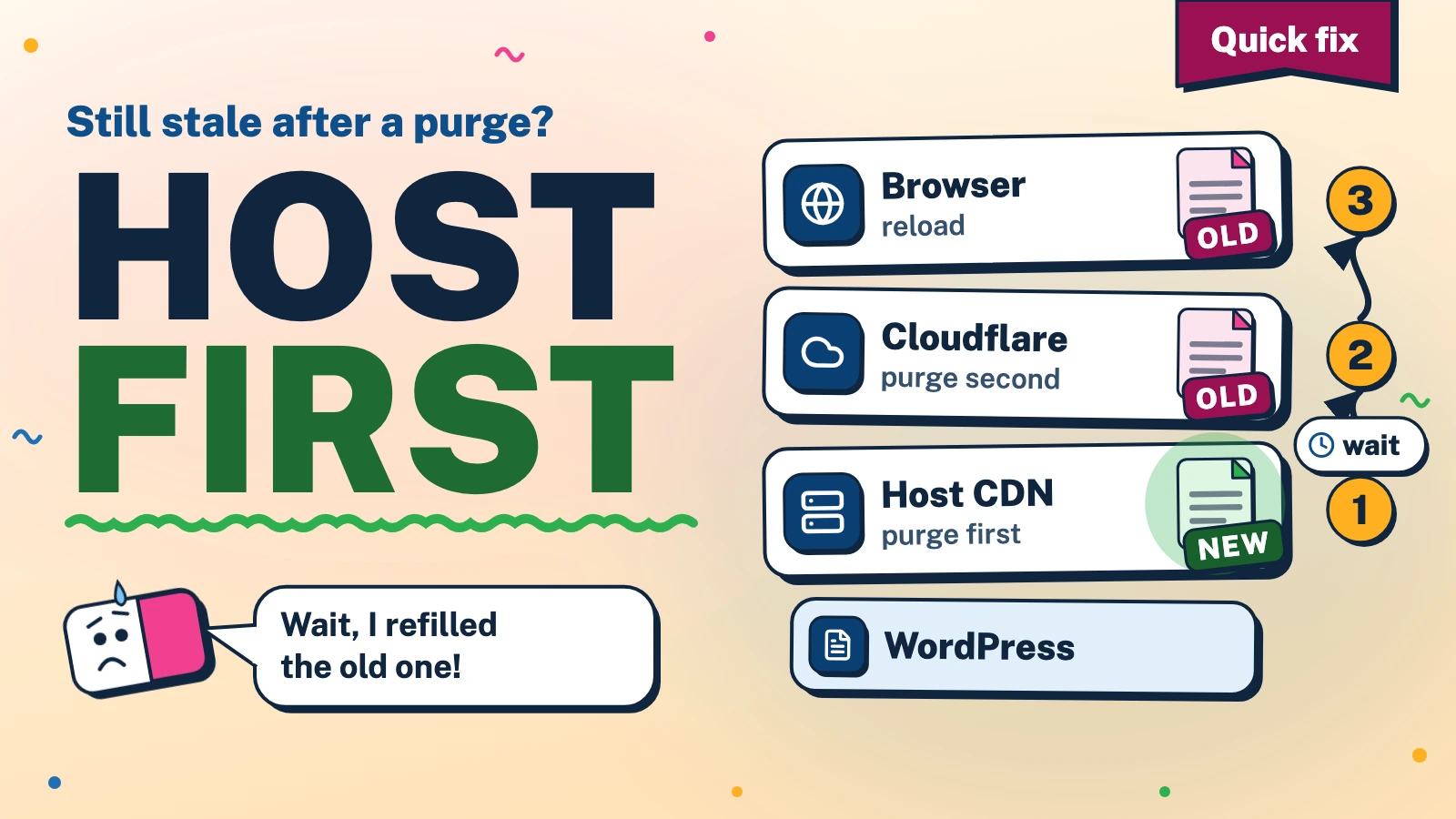
In short: When a WordPress page stays stale after a Cloudflare purge, a cache is still holding the old copy: the host’s CDN, Cloudflare itself, a page cache or the browser. Purge the host first and check it, because a Cloudflare purge refills from whatever the host still holds.
How do you fix a WordPress page that is still stale after a purge?
Work from the origin outward and read the headers at each step. Each layer refills from the one behind it, so order decides whether a purge sticks.
- Confirm the origin is right. Request the page with a throwaway query string such as
?nc=1. In our checks it missed both the Cloudflare copy and the host copy, but a cache rule can ignore query strings, so read the cache statuses too. If that request still shows the old text and both layers report a miss, the stale copy is inside WordPress, for example in a page-cache plugin, and no CDN purge will help. - Read the headers of the plain address with the command below and the table in the next section.
- Purge the host cache. On 20i that is the Purge Cache link in the WordPress admin bar, the Purge Everything button on the StackCache page in wp-admin, or Purge Everything under Edge Caching in My20i[1][2].
- Wait. After a full purge from its settings page, the StackCache plugin says: "Please allow a few minutes for all caches to clear globally." A success reply means the request was accepted, not that every copy is gone.
- Purge Cloudflare for the exact addresses: the page, the home page and any list that shows it. Cloudflare compares the host name without regard to case and the path exactly, so write the address as visitors request it[3]. If an address purge leaves the old copy, check your Cache Rules: Cloudflare documents that a rule matching only GET requests, or one using a custom cache key, can defeat a single-file purge[3]. Purge Everything is the blunt tool: requests for evicted pages must refill the cache, which raises origin load, and the Free plan allows five such requests a minute[4].
- Check again, then reload the browser. The first request after the purge should report
cf-cache-status: MISSand the secondHITwith a smallage(DYNAMICif Cloudflare does not store that page)[5]. If the text is still old andx-cdn-cache-statussaysHIT, the host copy survived: repeat steps 3 to 5 with a longer wait. The page we checked let browsers keep it for four hours, so hard-reload the tab, and look at the changed text while logged out or in a private window, because logged-in staff can bypass the caches[6].
The command below only reads response headers. Replace the address with a page of your own. Purging caches on a live site sends visitors to the origin for a while, so do it at a quiet moment. You use this information at your own risk, and iLogr accepts no responsibility for any loss or damage.
curl -s -o /dev/null -D - -A "Mozilla/5.0 (Macintosh; Intel Mac OS X 10_15_7) AppleWebKit/537.36 (KHTML, like Gecko) Chrome/130.0.0.0 Safari/537.36" \
  "https://example.com/page/" \
  | grep -i -E '^(http|cache-control|cf-cache-status|age|x-cdn-cache-status|last-modified)'
The browser-style user agent is there because a security rule may refuse plain curl.
Which layer is holding the old copy?
Read the output against this table:
| Header | What it tells you |
|---|---|
cf-cache-status |
HIT: Cloudflare answered from its stored copy. MISS or EXPIRED: it fetched the page from the layer behind it a moment ago. DYNAMIC or BYPASS: it did not store the page[5]. |
age |
On a Cloudflare HIT, STALE or UPDATING, the seconds since the copy was stored or last revalidated; it restarts after a purge. On DYNAMIC or BYPASS it can come from further upstream[5]. |
x-cdn-cache-status |
The host CDN's answer when Cloudflare last fetched the page[6]; on 20i it comes with x-provided-by: StackCDN. On a Cloudflare HIT it is old news, not a live reading. |
cache-control |
s-maxage is the lifetime for shared caches such as Cloudflare. max-age is for the browser, which ignores s-maxage[7]. |
last-modified |
A timestamp sent with the response. On the site we checked it moved with each fresh fetch, but it does not prove the page contains your edit. |
Then apply these rules. Old text with cf-cache-status of HIT, STALE or UPDATING came from Cloudflare's stored response[5]. Old text with Cloudflare fetching from behind it (MISS, EXPIRED, DYNAMIC) and x-cdn-cache-status: HIT points to the host copy. With neither layer serving a stored response, look inside WordPress. The command discards the body, so compare the changed text itself: if a separate request without cookies shows it and your browser does not, investigate the browser cache and cookie-dependent responses before deciding which is stale.
In one check on a live page, the plain address answered cf-cache-status: HIT with age: 477, and its last-modified was about eight minutes older than that of a query-string request for the same page.
Why does purging Cloudflare first make it worse?
A Cloudflare purge removes its stored copy. The next request is answered by what Cloudflare calls your origin web server and stored again in the data centre that served it[3]. With a host CDN in between, that "origin" is the host CDN. If it still holds the old page, Cloudflare stores it again for as long as the headers allow: an hour (s-maxage=3600) on the site we checked.
Two details make the host step easy to get wrong. Purges are requests, not guarantees: Cloudflare says a success reply does not confirm eviction and tells you to request the page again and look for a status other than HIT[4]. And failures can be silent: in the StackCache plugin version we read, an automatic purge after a post edit is one request with a short timeout, logged on failure only when debugging is switched on. A manual purge from the settings page does report failure.
What did a test with two caches in a chain show?
In a test, two caching web servers in a chain in front of a small origin stood in for Cloudflare and a host CDN. The origin sent the Cache-Control: header we saw on a live page, on pages and on 404 responses, and both layers honoured it. We made the host-layer purge finish 12 seconds after it was requested, to model a purge that is accepted first and applied later. The 12 seconds is a test setting, not a measurement of any service.
| What we did | What the visitor got |
|---|---|
| Edited the page, purged the upper layer, then asked the host layer to purge. | The old text. The upper layer refilled from the host's copy at once and kept it after the host purge finished. Asked directly, the host layer had the new text. |
| Asked the host layer to purge, waited, checked the host layer directly (new text), then purged the upper layer. | The new text on the first request, and it stayed. |
| Asked the host layer to purge and purged the upper layer straight afterwards. | The old text again: the upper layer refilled while the host copy was still there. |
| Requested a page before it existed (404), then created it at the origin. | The 404 stayed. Purging only the upper layer brought the same 404 back. Purging the host layer, waiting, then the upper layer returned the page. |
| Requested the page with a new query string. | The new text at once, while the plain address kept the old text. |

Layers do not tell each other about a purge, so a layer you skip keeps its copy until its lifetime runs out. On the live site, a host purge of one cached 404 address reported success, and Cloudflare kept its own copy: cf-cache-status: HIT, with age rising from 217 to 317 seconds over the next two minutes.
What did it look like on a real WordPress site?
On a WordPress site on shared hosting behind Cloudflare, with a Cache Rule that stores HTML for logged-out visitors, we saw the pattern on several edits of live posts:
- A Cloudflare purge made about a minute after a host purge was refilled with the old page. Both layers reported
HIT, andlast-modifiedwas fresh while the text was old. - After other edits, the new text showed on a query-string request, but the plain address kept returning
x-cdn-cache-status: HITwiths-maxage=3600, even after two host purges. Cloudflare reportedDYNAMICfor that page, so a Cloudflare purge had nothing to remove. - Once, a host purge and a Cloudflare purge of two addresses cleared a downloadable file but not the page linking to it.
We could not see why the host copy outlived repeated purges. The host's documentation says cached content is stored at multiple CDN nodes[8], which would fit a purge not yet reaching every node, but that is a reading, not an observation. We did not record when each copy cleared. The header allowed a shared cache an hour of freshness, but we did not establish when the host copy became fresh. Recheck the changed text after waiting, and purge Cloudflare again once the host serves the new version.
Why does a new post show a 404 after you publish it?
Cloudflare stores 404 responses. With no cache headers the default lifetime is three minutes[9]; when WordPress or the host sends s-maxage, the 404 follows that header[7]. On the site we checked, a 404 for a made-up address carried cache-control:, and the second request was a Cloudflare HIT. One early request, such as a status check on the new address before it is live, can pin a 404 for an hour.
- Check publication without the public address.
wp post get 123 --field=post_reads the state from the database, andstatus wp post list --name=your-slug --post_shows whether the slug exists.status=any - If a 404 is already pinned, purge that address in the host cache, wait, then purge it in Cloudflare, as in the 404 row above. Purging only Cloudflare brings the 404 straight back.
- Pages that list the new post are separate copies. On 20i the automatic purge after an edit covers that post, the index page and the feed[1][10]; category and tag pages are not on the list. A theme switch, Customiser save or plugin activation or deactivation purges everything, custom post types are skipped unless you enable an option[1], and in the plugin version we read nothing contacts Cloudflare.
How do you stop the layers fighting over the same page?
Three real choices:
- Let one layer cache the HTML. Cloudflare does not store HTML by default; it caches by file extension, and a Cache Rule is what changes that[9]. Removing it drops a layer from the purge routine but sends more requests to the origin.
- Keep both and shorten the lifetime. The StackCache settings list a Dynamic Cache lifetime that defaults to 3600 seconds[1], the figure we saw in
s-maxage. We did not change it to test. A shorter lifetime narrows the stale window but raises origin requests. - Purge from WordPress on every change. Cloudflare's WordPress plugin with Automatic Platform Optimization updates its edge when content changes[11], and on the Free plan APO has to be bought first[12]. Another route is a script or plugin that calls Cloudflare's purge API, which the Free plan offers[4]; it avoids the APO fee, but you maintain it. Either way, check that the host is purged first and Cloudflare after a wait.
References
Numbers in square brackets in the text link to these sources.
- 20i, "How do I configure StackCache?" (opens in a new tab).Used for: the admin bar purge link, automatic purge scope, the full-purge option and the default lifetime.
- 20i, "How do I use 20i's CDN?" (opens in a new tab).Used for: where to find Purge Everything under Edge Caching.
- Cloudflare, "Purge by single-file" (opens in a new tab).Used for: refill from the origin after a purge and how addresses are matched.
- Cloudflare, "Purge cache" (opens in a new tab).Used for: purge replies not confirming eviction and the Free plan purge limit.
- Cloudflare, "Cloudflare cache responses" (opens in a new tab).Used for: what each cache status and the age header mean.
- 20i, "Why am I getting a cache status 'MISS'?" (opens in a new tab).Used for: what the host's own cache status header reports.
- Cloudflare, "Cache-
Control" (opens in a new tab) .Used for: s-maxage for shared caches, max-age for browsers. - 20i, "What is 20i's CDN?" (opens in a new tab).Used for: cached content stored at multiple CDN nodes.
- Cloudflare, "Default cache behavior" (opens in a new tab).Used for: HTML not cached by default and the three-minute 404 lifetime.
- 20i, "When does StackCache clear my cache automatically?" (opens in a new tab).Used for: which edits trigger a full purge and which purge one address.
- Cloudflare, "Automatic Platform Optimization" (opens in a new tab).Used for: edge content updating when the WordPress plugin sees an edit.
- Cloudflare, "Activate the Cloudflare WordPress plugin" (opens in a new tab).Used for: APO needing a purchase on the Free plan.