
In short: Keep the model call out of the web request: authorise at the REST route, queue an idempotent job, bound the provider call and validate the result before it is stored or shown. The queue is the weak spot, because WP-Cron only runs when someone visits.
A production boundary for authenticated requests, background jobs, timeouts, retries and validated model output
An LLM feature in WordPress often starts as a very small demo. A form sends a prompt, PHP calls a model API, and the answer appears beneath the editor. It works, at least while everything is fast and only trusted people are testing it.
The problems show up when that shortcut reaches a real site. The API key finds its way into browser code, or a slow request holds a PHP worker until the host kills it. A logged-out visitor may be able to trigger a paid call. A harmless-looking retry can be billed twice. Model output gets saved as trusted HTML. Private order or customer data ends up in queue logs that were never meant to contain it.
A better prompt will not fix any of that. The useful work is at the application boundary, where WordPress can control access, state and failure handling around an unreliable external service.
The feature used as the example here is deliberately small. A logged-in editor asks WordPress to summarise some text and flag points that need checking. The model can propose text, but it cannot publish a post, edit a user, run SQL, choose a URL or call another tool. WordPress handles the request through its REST API, Action Scheduler runs the job, and a small PHP adapter talks to the provider. Whatever comes back is treated as untrusted input. There is no plugin to download: the article describes the design and shows only the excerpts that matter, so treat every number in it (limits, timeouts, lease length) as a starting point to adapt.
Who is involved in an LLM request, and who do you trust?
Even this modest feature has four separate actors:
- The browser collects user input and shows job state. It is not trusted with the provider credential.
- WordPress authenticates the user, checks a capability, validates the request and owns the durable job record.
- The background worker decrypts the queued input, calls a fixed provider endpoint and validates the response.
- The model provider processes submitted data and returns probabilistic output. It is neither part of WordPress nor a trusted source of application state.
That split leads to a few practical rules.
- Keep API keys in server configuration, never JavaScript, HTML or a public REST response.
- Check authorisation with a capability such as
edit_posts, not merely “is this user logged in?” - Require a WordPress REST nonce for same-origin cookie authentication.
- Reject oversized or malformed input before it becomes a paid request.
- Move the external call away from the interactive web request.
- Use a fixed allowlisted provider URL. Do not let a prompt or request parameter choose it.
- Validate the provider’s HTTP response and the model’s JSON before storing a result.
- Escape model text at the final output context, just like any other untrusted database value.
WordPress security guidance is clear on this point: never trust user input, validate and reject where possible, and escape as late as possible, including data from third parties[3]. A fluent model response is still third-party API data.
How do you secure the REST endpoint?
For a feature inside the WordPress dashboard, cookie authentication plus a REST nonce is the normal path. The browser sends X-WP-Nonce; WordPress associates the request with the logged-in user. Without the nonce, the API sets the current user to 0 and treats the request as unauthenticated, even if the browser still has WordPress cookies[2].
Authentication only tells us who made the request. Each custom route still needs a permission_callback that answers the more useful question: is this user allowed to perform this operation?[1] For an editorial assistant, current_user_can( 'edit_posts' ) is a reasonable starting point. Editing another author’s work or publishing content would need a more specific capability decision.
The create-job endpoint accepts only:
- a UTF-8 text value between 1 and 5,000 characters;
- an
Idempotency-Keyheader matching a conservative character and length rule; - a user who can edit posts.
It returns 202 Accepted with a job identifier. It does not wait for the model. A valid replay of an existing logical request returns that job with 200 OK.
The idempotency key makes ordinary retries safe. If the browser submits the same logical operation twice, the server returns the existing job instead of queueing and billing for another one. Store the key as a binary-safe hash, and bind it to the exact input with a keyed HMAC. That HMAC also prevents the comparison value from acting as a simple confirmation oracle for short or predictable prompts if only the database is exposed. Enforce uniqueness across (user_id, idempotency_hash), so two concurrent requests cannot slip through a “check then insert” gap. Reuse the key with different text and the API returns 409 Conflict rather than the wrong document’s result.
The read-job endpoint applies the same capability check and also checks ownership. Knowing or guessing a UUID does not let one editor read another editor’s prompt result.
Why should the model call run in a job queue?
A synchronous call ties together three clocks that should remain separate:
- the browser or reverse proxy request limit;
- the PHP-FPM or hosting execution limit;
- the model provider’s response time.
Turning up all three timeouts only makes a failure take longer while consuming web capacity. The interactive endpoint should do the quick work: validate, persist and enqueue. The provider call belongs in a worker.
Action Scheduler is a useful fit for many plugin deployments because it provides a WordPress-native queue, action records, failure logs and an administration screen[6]. It is not a timing guarantee, and the details matter for a feature that is called from a REST route. Its queue runner is attached to a WP-Cron event that repeats every minute. The faster path, an asynchronous loopback request that starts a queue run, is only attempted on the shutdown of WP Admin requests[6]. Action Scheduler’s source shows the same: the check is guarded by is_admin(). A REST request never triggers that admin check. A job queued from one with as_enqueue_async_action()[7] therefore waits for the next WP-Cron queue run, unless a queue runner happens to be active already, and WP-Cron itself only runs when a page is loaded[18].
What does a quiet site do to a queued job?
The numbers below come from a test on a plain WordPress 7.1.3 site (PHP 8.3, Action Scheduler 4.2.0, no other plugins). A small test route queued one async action per run, and the run time was read straight from the database, so the measuring never triggered WP-Cron.
| Set-up | What happened |
|---|---|
| Queued from a REST request, then no requests at all | Still pending after 2 minutes |
| Same, then one page load after 90 seconds | Ran 0.2 seconds after that page load |
| Queued from a REST request, a page load every 3 seconds (four runs) | Ran after 43 to 57 seconds |
Queued from a REST request, a REST request (/wp-json/) every 3 seconds, as browser polling would send (four runs) | Ran after 36 to 51 seconds |
| Queued from a wp-admin request (admin-ajax, three runs) | Ran within 20 milliseconds |
| Retry due in 60 seconds, no requests for 5 minutes, then one page load | Ran about 4 minutes late, straight after the page load |
DISABLE_WP_CRON set, a page load every 3 seconds | Still pending after 2 minutes |
DISABLE_WP_CRON set, then one wp-admin request (admin-ajax) 20 seconds after queuing | Ran 0.1 seconds after that request |
DISABLE_WP_CRON set, a script standing in for a system cron job and calling wp-cron.php on each minute boundary (three runs) | Ran after 23 to 46 seconds |
| Same simulated cron, retry due in 60 seconds (two runs) | Ran 44 and 51 seconds after its due time |
WP-Cron enabled, a page load every 3 seconds, but wp-cron.php answers 403 | Still pending after 100 seconds |
| Same 403, then one wp-admin request (admin-ajax) 20 seconds after queuing | Ran 0.1 seconds after that request |
Six things follow. A job queued from a REST route did not start at once: it waited for the next minute tick, and polling from the browser (which does count as traffic that can trigger WP-Cron) did not bring that forward. The same job queued from wp-admin ran immediately, so a feature that feels instant when tested through admin-ajax can feel slow behind REST. A retry delay is a minimum, not the actual wait. Switching WP-Cron off without putting a real scheduler in its place left the job pending, and a 403 on wp-cron.php did the same without any warning. Yet in both follow-up tests one wp-admin request ran it within about 0.1 seconds, because the admin path is separate (and limited to one dispatch a minute), so it can mask a broken cron-driven path while someone is working in the dashboard. Direct runners such as WP-CLI are a further path that does not depend on wp-cron.php[8].
Which hosting features does a queue need?
Whatever the numbers on your site, the cure is the same, and it depends on what the hosting plan allows. Before choosing a plan for a site that will run background jobs, check:
- A real scheduler. Can you set a system cron job that runs every minute, or run WP-CLI from the command line? With
DISABLE_WP_CRONset and a system task callingwp-cron.php, jobs run on a clock instead of on visits[19]. Action Scheduler can also be run directly withwp action-scheduler run[8]. - Loopback requests. WP-Cron starts by making a request to the site’s own
wp-cron.php. Anything that answers that request with a 401 or 403, such as a firewall rule or a basic authentication prompt, stops the cron-driven path. In the test above, a 403 onwp-cron.phpleft a job pending for the full 100 seconds of the run, while an admin request still ran it. - PHP limits. A worker runs inside a PHP request, so the execution time and memory limit apply to it.
WordPress’s own documentation notes that many shared hosting services do not provide access to the system scheduler[18], so read the plan’s cron documentation rather than assuming. High-volume or strict-latency sites should run the queue from a real scheduler and alert when it falls behind. Production monitoring should track the age of the oldest pending action, not just whether the enqueue call returned an ID.
What belongs in the queue arguments?
Keep the prompt out of Action Scheduler arguments. Arguments and failures are visible in its operational records, and the serialised argument has a size limit: the database store rejects arguments longer than 8,000 characters once JSON-encoded[17]. In a test, a 5,000-character ASCII prompt was accepted (5,004 characters as JSON), but 5,000 accented or Japanese characters encode to 30,004 characters and were rejected. as_enqueue_async_action() does not throw in that case: it returns 0 and only logs the error, so code that ignores the returned ID loses the job silently. Check it for zero. Only a random job ID goes onto the queue. The prompt and validated result live in the database in encrypted form, using a 32-byte key supplied through the environment. Once a job succeeds or fails, the worker deletes the encrypted input. The encrypted result stays until the site’s retention policy removes the job row.
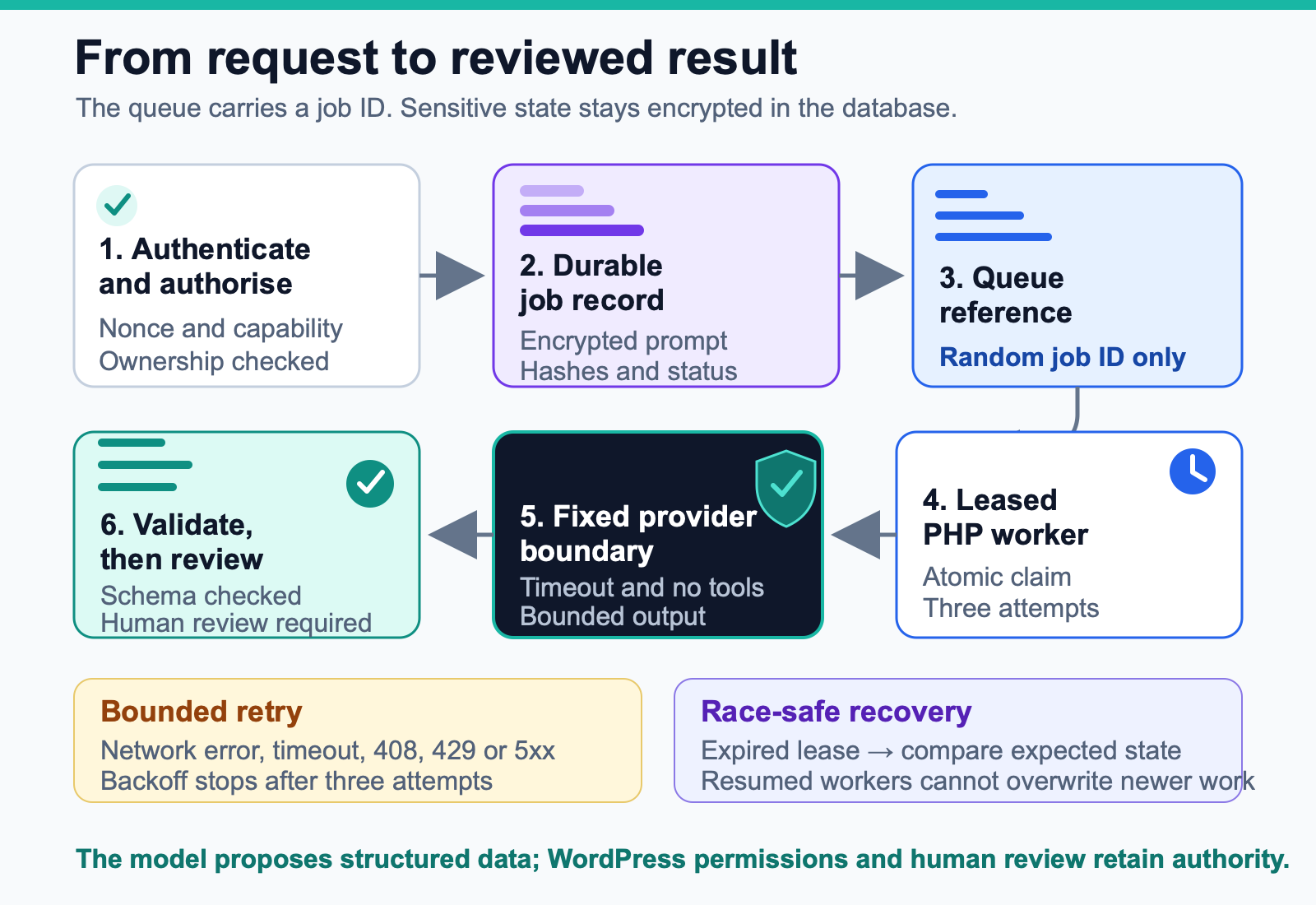
Encryption does not make the privacy question disappear. It reduces casual database and log exposure, but the running application can still decrypt the value. HTTP debugging, Query Monitor, APM agents and logging plugins may capture the plaintext request body and the Authorization header passed to wp_remote_post(). Those paths need auditing and redaction, or request-body capture should be disabled for the provider host. Before launch, decide what content is allowed, how long inputs and outputs remain, who can inspect jobs, and whether the provider’s account controls are suitable for that data.
How should the provider call be made?
The provider adapter should be dull on purpose. Make one wp_remote_post() request[4] to a constant HTTPS endpoint and set:
- a server-side bearer token;
- JSON content type;
- a 20-second HTTP timeout;
- zero redirects;
- a client request ID derived from the internal job ID;
store: falsefor the request;- a maximum output-token budget;
- a strict JSON Schema for the result.
For the Responses API, store defaults to true and stored response data is kept for at least 30 days. Setting store: false opts out of storing the generated response for later retrieval by API ID[10]. It does not mean that no provider-side data is retained. OpenAI documents separate abuse-monitoring logs that are retained for up to 30 days by default; approved Modified Abuse Monitoring or Zero Data Retention controls change that handling[12]. The application must evaluate those account controls independently. The x-request-id and the client request ID remain troubleshooting identifiers, not a way to retrieve a response that was not stored[9].
Keep the URL fixed. If an administrator needs to configure it, validate the host against an explicit allowlist. Where arbitrary remote URLs are genuinely required, WordPress provides wp_safe_remote_post(), which validates the URL and every URL it redirects to, to avoid server-side request forgery[5]. The model must never choose the destination of its own HTTP request.
A timeout is not proof that the provider did no work. The request may have reached the provider and completed after WordPress stopped waiting. Retrying a text-only generation is operationally safer than retrying a mutation, but it can still duplicate cost. OpenAI documents X-Client-Request-Id for correlation and support lookup, and says nothing about deduplication[9], so do not rely on it to prevent a double charge. Record your internal request ID, the provider request ID when available, attempt count and terminal outcome. Never log the bearer token or full prompt. The wider treatment of deadlines, retry budgets and per-request cost limits is in Controlling LLM API Cost and Latency in PHP[14].
Vendor details stop at the provider adapter. The job controller does not need to know about model names, response layout or authentication headers. Changing provider should mean changing the adapter and its contract tests, not reworking REST permissions or job ownership.
Is structured output enough to trust a model result?
No. The model is asked to return this shape:
{
  "summary": "A concise editorial summary.",
  "risks": ["A statement that needs human verification."],
  "needs_human_review": true
}
A strict output schema solves one useful problem: it reduces malformed JSON and unexpected fields for supported models[11]. It does not prove that the summary is correct, the risk list is complete, or the text is safe to render as HTML. A safety refusal can also sit outside the supplied schema, so the adapter checks for the documented refusal item and records a distinct terminal error instead of calling it missing output[11].
The PHP worker therefore validates again after json_decode(): types, lengths, the maximum of five bounded risk strings, a boolean needs_human_review, and no downstream action chosen from model text. Structured LLM Outputs and Tool Calling in PHP[15] covers that second validation step in detail.
The validated summary and risks are unformatted text rather than markup, and the UI is expected to render them with esc_html() or an equivalent context-specific escape. If a feature intentionally supports model-generated HTML, parse it through a deliberately small wp_kses() allowlist. Do not save arbitrary model HTML and assume the editor will notice a dangerous attribute later.
Prompt injection still matters even when no tools are enabled. User or retrieved text can ask the model to ignore instructions, reveal hidden content or change the response format. A strict schema helps, but it is not a defence. The reliable control is architectural: the model has no WordPress credentials, no database handle and no tool that can publish or delete[13]. Even a compromised response is then only a bounded proposal that must pass deterministic validation and human review. Prompt Injection in CMS and RAG Systems[16] goes through the defences one by one.
Which failures are worth retrying?
The phrase “retry on error” hides too much. What matters is whether another attempt can reasonably change the outcome.
| Failure | Example | Treatment |
|---|---|---|
| Invalid local input | Empty text, invalid UTF-8, oversized request | Reject before queueing |
| Authentication or permission failure | Missing REST nonce, user lacks capability | Return 401 or 403; do not queue |
| Permanent provider rejection | Most 400, 401, 403 responses | Mark failed; operator action required |
| Rate limit or temporary provider failure | 408, 429 or a 5xx response | Retry with bounded exponential backoff and jitter |
| Network error or timeout | DNS, connection reset, timeout | Retry cautiously; duplicate cost is possible |
| Incomplete or refused model response | Output budget exhausted, documented refusal | Mark failed with a distinct error; review model and policy configuration |
| Invalid model result | Bad JSON or contract violation | Mark failed; do not repeatedly ask the same model to repair itself |
| Queue delay | Pending action is older than its service target | Alert on queue health; do not create duplicate jobs |
Allow three attempts at most. A temporary failure schedules a fresh action after a capped delay. A permanent failure stores a short, non-sensitive code and message. The browser receives a stable public status, never the raw provider response.
A scheduled retry is subject to the same cron rule as the first run. A retry due in 60 seconds is only attempted when something triggers the queue, so on a quiet site the backoff is a minimum, not the actual wait. Set maximum attempts, input size, output tokens and a per-user or per-site allowance outside the model, because provider rate limits protect the provider, not your budget. Cost limits are worked through in[14].
How do you keep job state recoverable?
Give the job five visible states:
queued -> running -> succeeded
                  -> retry_wait -> running
                  -> failed
The worker claims a job with an atomic database update. Only a row in queued or retry_wait can become running, so only one worker can claim a job in its current state. A genuine database error during the claim is different from losing that race and schedules a replacement attempt.
An atomic claim cannot rescue a worker that dies after setting the row to running. A fatal error, process kill or exhausted execution limit can leave that row stuck. Each run therefore receives a three-minute lease and a random lease token. Writes made by that worker must carry the same token.
A recurring recovery action releases an expired job to retry_wait and clears its token. If the old worker wakes up later, it can no longer overwrite the recovered state, although the provider request it already sent may still have been billed, so duplicate cost remains possible. Terminal recovery writes also compare the expected state and timestamp, which protects a job that happened to finish while the recovery pass was working from an earlier snapshot.
Keep the timing rules separate. Provider retries can wait for up to five minutes, while pending jobs are not considered stale until six minutes have passed. Database claim errors have their own bounded reschedule count. The same recovery pass can find an old queued job with no scheduled action, and its scheduler check can be cached for an hour rather than repeated on every request. None of this replaces queue monitoring. If the scheduler itself never runs, an application-level recovery task cannot help, because it runs on the same scheduler.
Every terminal write records an update time. On success, the worker encrypts and stores the validated result with the provider request ID, then clears the encrypted input. Failure stores a bounded error and clears the input as well. REST timestamps are UTC and carry an explicit Z. A real deployment also needs retention cleanup for completed rows, with aggregate metrics recorded before deletion.
Useful operational signals include:
- jobs created, succeeded, retried and failed;
- queue wait time and model-call duration;
- oldest pending job age;
- input and output tokens if the provider returns them;
- HTTP status and stable error class;
- cost by feature, site and environment;
- result rejection count after schema validation.
Logs should contain identifiers and classifications, not prompts, responses, cookies or keys. Restrict access to the queue administration screen because action names, arguments and errors are still operational data. Review WordPress HTTP debugging hooks, diagnostic plugins and APM configuration as part of the release, since they can observe request headers and bodies even when your own plugin never calls error_log(). Tracing the whole path is covered in Observability for AI Applications with OpenTelemetry[20].
How should the browser get the result?
The browser only needs two operations:
POST /wp-json/example-llm/v1/jobswith the text, REST nonce and idempotency key.GET /wp-json/example-llm/v1/jobs/{job_id}until the job reachessucceededorfailed.
For a small editorial tool, polling every two or three seconds is enough. Stop after a client-side deadline and let the editor return later. A browser timeout should neither cancel the server job nor submit a replacement. Keep the same idempotency key when retrying the same logical request. Generate a new one when the input changes; the server rejects an old key whose input hash no longer matches.
When the job succeeds, render the summary and risks as text. Treat needs_human_review as workflow state, not an instruction to WordPress. The model does not decide whether a post can be published.
What should the first version leave out?
Keeping the first version narrow matters. It should not:
- expose a public anonymous endpoint;
- stream model output through a long PHP request;
- allow the model to call WordPress functions or remote tools;
- let model output select a URL, SQL query, PHP callable or post ID;
- send an entire post, user record or order object by default;
- store plaintext prompts in queue arguments;
- publish or update WordPress content automatically;
- treat a syntactically valid response as factually correct.
Any of those capabilities can be added later, but each changes the threat model. Tool calling, retrieval and autonomous actions need their own permissions, provenance, approval and audit design. They should be deliberate product decisions, not side effects of enabling a convenient SDK option.
What should you check before launch?
Before enabling an LLM feature on a real WordPress site, verify the following outside the happy path.
Access and data
- The route requires authentication, a REST nonce where cookie authentication is used, and the correct capability.
- Job reads enforce ownership or an explicitly documented supervisory capability.
- Secrets live in server configuration or a secrets manager and never reach the browser.
- Permitted and prohibited data classes, provider retention, regional processing and deletion behaviour are documented.
- Prompts and model responses are absent from routine application and queue logs.
- HTTP diagnostics and APM tools are configured to redact the provider request body and authorisation header.
Reliability and cost
- The interactive request returns after durable enqueue rather than waiting for the model.
- A real scheduler (system cron or WP-CLI) drives the queue, or the oldest pending job age is monitored and alerts.
- Duplicate submissions return the existing job only when the input hash matches; mismatches return
409. - Timeouts, retryable statuses, permanent statuses, backoff and maximum attempts are tested.
- Queue lag, expired leases, the recovery action and failed actions are monitored.
- Token, request and site-level budgets exist independently of provider limits.
Output and authority
- Model output is constrained to the minimum schema the feature needs.
- PHP validates types, lengths, counts and allowed identifiers after decoding.
- UI output is escaped for its final context.
- The model has no mutation permission that the feature does not require.
- Human approval remains explicit for publication or other consequential changes.
Conclusion
Calling a model from WordPress is easy. Running that feature reliably is the harder part. The request crosses a browser session, WordPress permissions, a durable queue and a remote provider before an untrusted response comes back. Wrapping the whole journey in one wp_remote_post() call does not remove those failure modes; it just makes them harder to see.
Most of the solution is conventional application engineering. Authenticate and authorise at the REST boundary. Cap the input. Queue an idempotent job. Keep secrets and prompt data out of the browser and operational logs. Bound the provider call, classify failures, validate the returned data and escape it when displayed.
Once those controls are in place, the model has a modest role: it writes a proposal. WordPress decides who may ask, the queue decides when the work runs, PHP decides what shape the answer may take, and a person decides what happens next.
Next step: On a test copy of your site, queue one action from a REST request, leave the site unvisited for two minutes and note when it runs. Then decide whether it needs a real cron job.
References
Numbers in square brackets in the text link to these sources.
- WordPress Developer Resources: Routes and Endpoints (opens in a new tab).Used for: permission_callback as the access check on every custom route.
- WordPress Developer Resources: Authentication (opens in a new tab).Used for: the X-WP-Nonce header and why a missing nonce makes a request unauthenticated.
- WordPress Developer Resources: Security (opens in a new tab).Used for: never trusting input, validating, and escaping late, including third-party data.
- WordPress Developer Resources: HTTP API (opens in a new tab).Used for: the default timeout and redirection arguments of remote requests.
- WordPress Developer Resources: wp_safe_remote_post() (opens in a new tab).Used for: validating the URL and every redirect against server-side request forgery.
- Action Scheduler: Background Processing Job Queue for WordPress (opens in a new tab).Used for: the WP-Cron queue runner and the async loopback on WP Admin requests.
- Action Scheduler: API Reference (opens in a new tab).Used for: the functions that queue an async action or schedule one for later.
- Action Scheduler: WP CLI (opens in a new tab).Used for: running the queue from the command line with action-scheduler run.
- OpenAI API: API Overview (opens in a new tab).Used for: x-request-id and X-Client-Request-Id as troubleshooting identifiers.
- OpenAI API: Create a model response (opens in a new tab).Used for: the store parameter, its default and the 30-day storage.
- OpenAI API: Structured model outputs (opens in a new tab).Used for: refusals outside the schema and what schema adherence does not cover.
- OpenAI API: Data controls in the OpenAI platform (opens in a new tab).Used for: 30-day abuse-monitoring logs and the approval-only ZDR and MAM controls.
- OWASP GenAI Security Project: LLM06:2025 Excessive Agency (opens in a new tab).Used for: giving the model no permissions beyond what the feature needs.
- iLogr: Controlling LLM API Cost and Latency in PHP.Used for: deadlines, retry budgets and cost limits in depth.
- iLogr: Structured LLM Outputs and Tool Calling in PHP.Used for: PHP validation of decoded model output.
- iLogr: Prompt Injection in CMS and RAG Systems.Used for: prompt injection defences in depth.
- Action Scheduler source: ActionScheduler_DBStore.php (opens in a new tab).Used for: the 8,000-character limit on JSON-encoded action arguments.
- WordPress Developer Resources: Cron (opens in a new tab).Used for: WP-Cron only being triggered on page load, and late scheduled tasks.
- WordPress Developer Resources: Hooking WP-Cron Into the System Task Scheduler (opens in a new tab).Used for: DISABLE_WP_CRON and calling wp-cron.php from a system scheduler.
- iLogr: Observability for AI Applications with OpenTelemetry.Used for: tracing a request through the queue and the provider call.