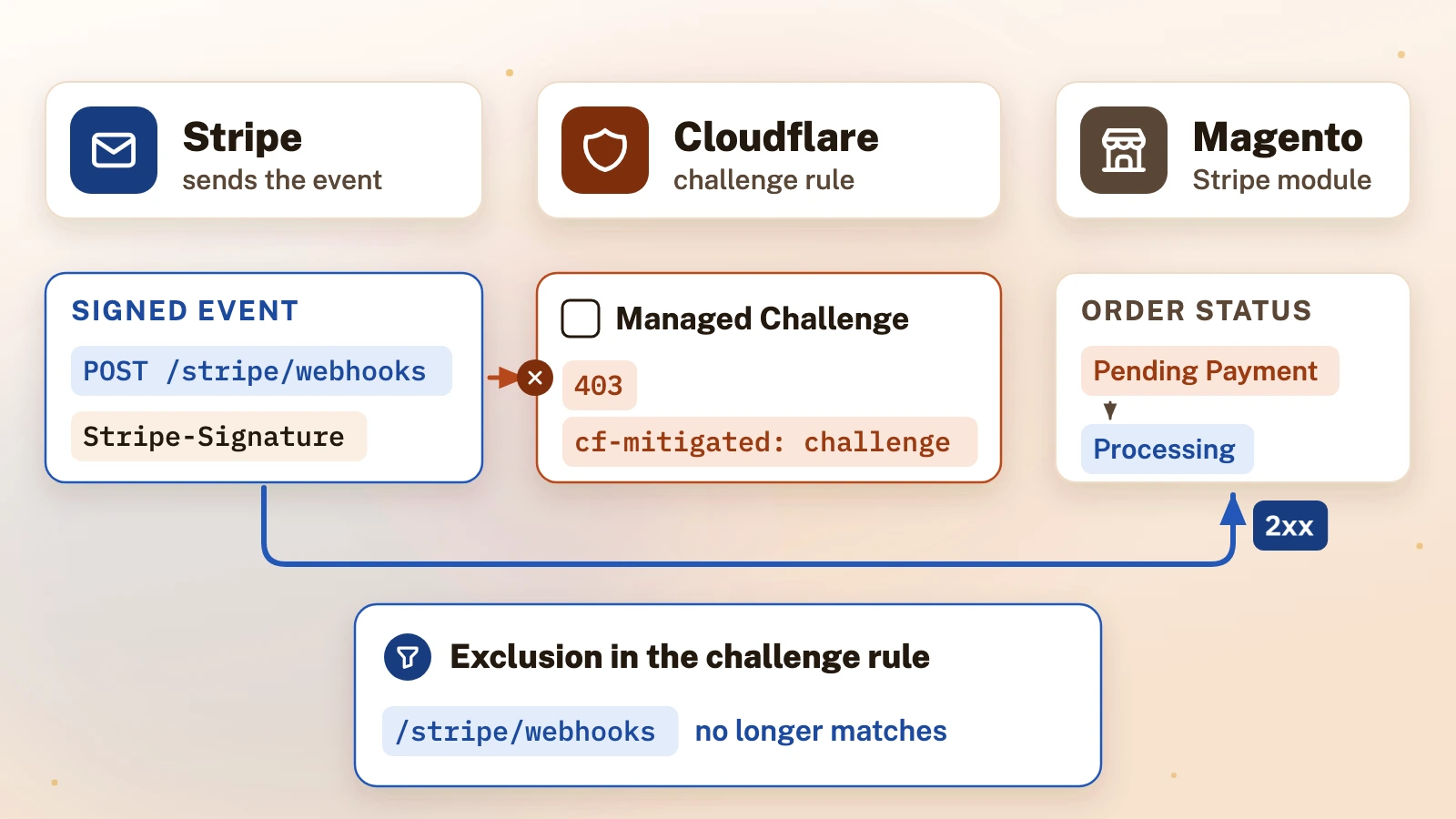
In short: A Cloudflare challenge rule can stop Stripe’s webhooks reaching a Magento store, because Stripe’s server-to-server requests cannot pass a challenge. Exclude the webhook path from that rule instead of adding a wide Skip rule, then prove the fix with a real signed event.
A challenge rule is a quick way to slow a botnet down on a Magento store, and it can cut off the payment provider too. Stripe tells the store about payments, refunds and disputes through webhooks: server-to-server POST requests that cannot solve a challenge page. This guide covers the fix, the field note behind it, and the tests that prove it. Facts were checked against Stripe's documentation, Cloudflare's documentation and the source of Stripe's official Magento module, version 4.6.7.
How do you fix Stripe webhooks that a Cloudflare challenge rule blocks on Magento?
Before you change anything: the rule changes in this guide alter how Cloudflare protects a live store. Export or note each rule before you edit it, try the change on a staging site first where you have one, take a backup of the store before any recovery work, and make every change at your own risk. iLogr cannot see your site and accepts no responsibility for damage, data loss or downtime.
- Confirm the failures are at Cloudflare, not in Magento. In Stripe, open the webhook endpoint's Event deliveries tab and click a failed event; it shows the HTTP status code of each attempt[1]. A Cloudflare challenge answers with a 403[2] and a
cf-mitigatedheader set tochallenge[3]. A failure that Magento produced comes back from the module instead, for example a 400. - Find the rule. In Cloudflare's Security Events, the sampled logs show the action taken and the security feature that applied it[4]. Compare the rule's creation time in the Audit Logs[5] with the time of the first failed delivery.
- Exclude the webhook path from that rule. Edit the challenge rule's own expression so that it no longer matches the webhook URL: in the expression editor, wrap the existing expression in brackets and add
and not (. Stripe's module builds the URL from a store view's base URL plushttp. request. uri. path eq "/ stripe/ webhooks") /stripe/webhooks[6], so copy the exact path from the endpoint in Stripe; a store in a subdirectory has a longer one. - Do not reach for a Skip rule first. It can switch off far more than the challenge for that path (see below).
- Prove the fix with a signed event. Resend one failed event from the Stripe Dashboard and check for a 2xx in Event deliveries, then check the Magento order it belongs to.
- Recover what was missed. Stripe retries failed deliveries for up to three days in live mode[1]. Anything older needs a manual resend, or the module's own commands for processing past events[7].
What did the failure look like on a Magento store? (field note)
Field note (a Magento store behind Cloudflare): a custom rule with a challenge action had been added in Cloudflare to slow down a botnet. It applied to every path on the site, so nobody thought about the webhook URL. Within hours of the rule's creation, Stripe deliveries to the store began to fail, and they kept failing: Stripe's dashboard recorded hundreds of failed deliveries before the cause was found. The store saw it from both sides. Stripe sent emails warning that the webhook endpoint was failing, and orders stopped updating in Magento as payment events stopped arriving.
The first test was a direct POST to the webhook URL. It came back with the module's own error, Webhook origin check failed, and an HTTP 400. That looked like a healthy route, and in one sense it was, but it said nothing about Stripe's requests (the next sections explain why). The quick fix on the table was a Skip rule for the webhook path. The selected settings would also bypass rate limiting and the managed WAF rules for that path. The fix that stayed was narrower: the challenge rule itself now excludes the webhook path. After the exclusion, Stripe's automatic retries delivered the failed events; nothing had to be resent by hand.
Stripe's documentation explains why the orders stalled. Webhooks are what let the module mark Magento orders as ready for fulfilment, record refunds and add payment failure comments[8]. Orders that stay in Pending Payment instead of moving to Processing can mean the webhooks are missing[7].
How do you tie failed webhooks to a Cloudflare rule?
Start with timing, then confirm it. Compare the rule's creation or change time with the first failed delivery, then confirm the match in Security Events or in the delivery response; timing alone is not proof. Cloudflare's Audit Logs include zone configuration changes, are available on every plan and keep entries for 18 months[5]. Stripe's Event deliveries tab lists each event as Delivered, Pending or Failed[1]. If the first failure follows a rule change, that rule is the first suspect.
Then read the response. Stripe's own table of delivery errors names 401, 403 and 405 as signs of "access restrictions" at the destination[1]. Cloudflare marks every challenge page with the cf-mitigated: challenge header[3], and its documentation lists custom or managed rules with a challenge action among the causes of a Cloudflare-branded 403[2]. A 403 that carries that header and an HTML body came from Cloudflare, not from Magento.
Why is the challenge fatal? A Managed Challenge lets Cloudflare pick which challenge to show[9], but every type needs a browser: Cloudflare's own list of unsupported clients includes command-line tools "that lack JavaScript execution capabilities"[10]. Stripe sends server-to-server POSTs rather than running a browser, so its deliveries cannot solve a browser challenge. And because a challenge is a terminating action, the request stops there and never reaches Magento[11].
What does a direct 400 from the webhook URL prove?
Less than it seems. In version 4.6.7 of Stripe's Magento module, a GET request to the webhook URL returns a 200 with the message "Your webhooks endpoint is accessible from your location." With the origin check enabled and signing secrets configured, a POST must carry a Stripe-Signature header that verifies against one of the store's signing secrets. A request without one fails with "Webhook origin check failed." and an HTTP 400[6].
So a test POST that gets this 400 proves three things: Cloudflare let that request through, Magento routed it to the module, and the module's signature check is switched on. It does not prove that:
- Stripe's requests get through. The test came from your own connection, not from Stripe's servers. Cloudflare evaluates each request against the rule's conditions, and a rule that matches on network, location or threat signals can let your test through while it still challenges Stripe. Only a delivery from Stripe tests the path Stripe takes.
- The signature will verify. The test had no valid signature. A real event can still fail if the signing secret stored in Magento does not match the endpoint in Stripe.
- The order will update. Even a verified event has to be processed against the right order.
Do not switch the origin check off to make a test pass. Stripe's documentation says the module uses webhook signatures to verify that events came from Stripe, and that this protection can be disabled only in developer mode[8]. Signature verification is what keeps forged payment events out, and Stripe recommends it alongside allowlisting its published webhook IP addresses[1][12].
Why is a Skip rule wider than it looks?
A Skip rule feels like a simple way to let Stripe in. In Cloudflare it is a set of switches, and they reach a long way. A custom rule with the Skip action can skip the remaining custom rules, and separately all rate limiting rules, all Super Bot Fight Mode rules and all managed rules, plus older products such as Browser Integrity Check and Security Level[13]. Custom rules run in order[14]. To get past a custom challenge with Skip, the Skip rule must sit before it in the same ruleset with "All remaining custom rules" selected[13], and that also skips every later rule in that ruleset. Skipping rate limiting or managed rules is a separate choice.
Cloudflare's security phases run in a fixed sequence, and among them custom rules come before rate limiting, managed rules and Super Bot Fight Mode[11]. The Free Managed Ruleset is available on every plan[15]. Ticking "All rate limiting rules" and "All managed rules" bypasses the store's Cloudflare rate limiting and request-phase managed rules for every request to the webhook path. The URL is public, so that is a real loss. Other protections may remain, but the module's signature check does not replace those controls.
Editing the challenge rule's own expression avoids all of that. The webhook path drops out of that one rule, and every other rule, the rate limit and the managed rules still apply to it. If you want the exception narrower still, Stripe publishes the IP addresses its webhooks come from[12], and the exclusion can require both the path and those addresses. Keep in mind that Stripe can change that list.

How do you prove signed Stripe webhooks are processed again?
Test what failed: a signed delivery from Stripe to the live endpoint.
- Resend one failed event. In the Stripe Dashboard, open the event and click Resend; this works for up to 15 days after the event was created. The Stripe CLI can resend for up to 30 days[1]. A resend does not cancel Stripe's own retries[1].
- Read the delivery. The new attempt should show a 2xx status in Event deliveries. A 403 with
cf-mitigated: challengemeans a rule still matches; a 400 with "Webhook origin check failed." means origin verification failed. For any other 400 from the module, read its response and the webhook log: missing signing secrets or an invalid payload can also cause one[6]. - Check the order. Open the Magento order behind that event and confirm it moved on, for example from Pending Payment to Processing, or shows the refund.
- Watch the next real events. Pending retries should now go through on their own while Stripe is still retrying[1].
- Check that the endpoint is still enabled. Stripe disables an endpoint that has been "unresponsive or responding with errors for several days"[16], and a disabled endpoint gets no further retries of its events[1]. If Stripe disabled it, fix the cause and enable it again, but do not assume old retries will restart: reconcile the missed events and recover them within the resend limits above, or with the module's commands for processing past events by ID or date range[7].
A captured request replayed from your own machine is no substitute. Stripe signs each delivery with a timestamp, and its libraries reject a signature more than five minutes old by default[1].
The same kind of challenge rule also breaks other machine-to-machine calls, such as WordPress cron on a WooCommerce site; that is a separate problem with its own fix, described in WooCommerce WP-Cron 403 Forbidden Behind Cloudflare.
How do you stop the next rule change from breaking webhooks?
Run the same short, read-only check after every change to Cloudflare rules:
- Read each challenge or block rule and ask whether it can match the registered webhook host, path and Stripe's deliveries. Note any match you are unsure of.
- Send one unsigned POST to the webhook URL and see whether the response carries
cf-mitigated: challengeor comes from the module. - Open the endpoint's Event deliveries in Stripe and look for any non-2xx status since the change, and the time of the first one.
- Put the rule change times from the Audit Logs next to those failure times.
Keep the fixes that feel fastest out of this routine. Creating a Skip rule, turning off the module's origin check or resending live payment events each either widens what the store accepts or replays money-moving events, so make those changes deliberately, one at a time.
References
Numbers in square brackets in the text link to these sources.
- Stripe Documentation, "Receive Stripe events in your webhook endpoint" (opens in a new tab)Used for: How Stripe retries, lists and resends webhook deliveries, and why signature checks matter.
- Cloudflare Docs, "Error 403" (opens in a new tab)Used for: A Cloudflare challenge answers with a 403.
- Cloudflare Docs, "Detect a Challenge Page response" (opens in a new tab)Used for: The cf-mitigated: challenge header.
- Cloudflare Docs, "Security Events" (opens in a new tab)Used for: Where Security Events show the action and feature that applied it.
- Cloudflare Docs, "Review audit logs" (opens in a new tab)Used for: Audit Logs for rule change times, plans and retention.
- Stripe, stripe-
magento2- (read 12 October 2026)Used for: Webhook URL, origin check and signature handling in module 4.6.7.releases, module version 4.6.7: Helper/Webhooks.php and Helper/WebhooksSetup.php (opens in a new tab) - Stripe Documentation, Adobe Commerce, "Troubleshooting" (opens in a new tab)Used for: Pending Payment symptoms and the commands for processing past events.
- Stripe Documentation, Adobe Commerce, "Configure the Stripe module" (opens in a new tab)Used for: What the module uses webhooks for.
- Cloudflare Docs, Ruleset Engine, "Actions" (opens in a new tab)Used for: How a Managed Challenge picks a challenge.
- Cloudflare Docs, Cloudflare Challenges, "Supported browsers" (opens in a new tab)Used for: Why command-line clients cannot solve a challenge.
- Cloudflare Docs, WAF, "Feature interoperability" (opens in a new tab)Used for: Order of the security phases and that a challenge ends the request.
- Stripe Documentation, "Domains and IP addresses" (opens in a new tab)Used for: Stripe’s published webhook IP addresses.
- Cloudflare Docs, WAF custom rules, "Available skip options" (opens in a new tab)Used for: What the Skip action can switch off and where it must sit.
- Cloudflare Docs, WAF, "Custom rules" (opens in a new tab)Used for: Custom rules run in order.
- Cloudflare Docs, WAF, "Managed Rules" (opens in a new tab)Used for: The Free Managed Ruleset on every plan.
- Stripe Support, "Why is Stripe trying to reach my webhook endpoints?" (opens in a new tab)Used for: Stripe disabling an unresponsive endpoint.